 OK, if you are anything like me, you probably have never read nor have any idea where your iPhone 4 instructions are (come on, I’m a guy, enough said), but one thing that has frustrated me to death was how to close background applications on the iPhone 4, sucking the little battery life out of the device.
So, allow me to spare you the potential loss of speed and battery life your iPhone 4 may suffer in the future from tons of open apps.
In order to have the best performance on your iPhone 4, make sure to close the apps you don’t need in the background. To do this, simply follow these instructions:
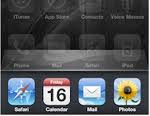
1. Double tap your home button. When you double tap the home button your multitask view will appear.
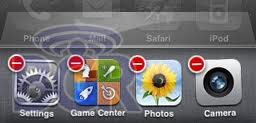
2. Tap and hold the app icon you want to close, just as you would on the home screen to rearrange icons or delete an app.
3. Hold the app icon until a red “-†button appears in the left-hand corner of the icon.
4. To close the app, tap on the red button in the corner of the app you want to close. What I do as well is to close ALL of the apps I am not using. You will find that nearly every app you have ever opened will be open at this point (ah, no wonder your battery runs out so quickly huh?).
Now those battery sucking, memory and speed eating apps will actually be closed on your iPhone 4 (yea!).
Hope this helps, let me know by leaving a comment below if it did!
and how do you start them up again after closing them?
Just click on them in your screen.
I have a friend who has an iphone 4S and when she double taps the home button to cut off icons running in the background, instead of the red dot with a white line in it, it comes up with a white rectangle. What is the problem?
Hi,
I’m wondering if you happen to know how differently I can close background apps as the “tap and hold the home button” on my device gives Siri instead. I believe I must have set this myself unintentionally sometime ago. Really appreciate any help on this.
Thanks, Cheavy
Double-click the home key.
Thanks I just bought the iphone 5, was almost dissapointed at how fast my battery died.
Very helpful, had about 10 apps running
Marvin is correct. If you jailbreak your iOS device you can install an app called SBsettings from Cydia which will show you which apps are actually running, and allow you to close them. The double-tap on home button list of apps is just the list of recently opened apps which may or may not still be running. Most recently opened app begins at the left and works to the right.
Contemplating upgrading to iPhone 5 which doesn’t currently have an untethered jailbreak so was looking for a “normal” way to close apps but keep running across the same information posted above…
Glad it helped!
thnx nearly all were open.i also got a huge bill last month , now i know why !!!
thanks did wonder y my phone kept dying even rang apple support as thought it was a battery fault as my battery kept dying after like 20 mins
Thank you so much. My battery life has beem absolutely horrible.
I’ll have you know when I did this I was apparently running every single app on my phone.
Learned how to do it a few weeks ago but doesn’t seem to speed anything up! Guess I just have too much on the phone. 🙂
Try clearing up your phone memory of all the junk and temporary files
This helped me a lot- could not figure out how to close the aps
This is why i like Android than iOS… i don’t need to double tap the home button to close background apps… i installed a talk killer app and it will kill all background task automatically…
Here is a a great app for conserving battery life:
BATTERY DOCTOR (get the full version for $0.99)
http://goo.gl/coOG
I have used it for a long time now 😉
Sorry to disappoint you, but that will have no effect at all on your battery life. Those apps are not actually running. Yes, it is good to clear out all your apps now and then but the only way to improve your battery life is to turn off things that use system services which do run in the background:
Turn off Ping
Turn off notifications from apps that you don’t want them from
Turn off bluetooth
Turn off wifi if you are not in a place where you are using it
Turn off 3G if you are not using it
Turn off location services for apps that you don’t need them for.
(and you probably want to turn off location based iAds too)
Trim down what spotlight will search for – this stops it indexing so much and so improves battery
Any of these (and more), but not killing apps I’m afraid, that does nothing
Thanks for the added info Marvin!